
East Hartford Resident Lookup Coverage
One person can appear in several East Hartford record systems, but each appearance has a narrow meaning. A property card identifies a public owner field. A voter record can show registration evidence where public. A court index identifies a party or docket. A vital record confirms an event only when the requester qualifies. A business or license filing documents an affiliation at a point in time.
| Record | What It Confirms | Where | Access boundary |
|---|---|---|---|
| Assessor card and GIS | Public owner, situs, mailing fields, CAMA, map/lot, book/page clue | East Hartford Assessor | Current public card; not proof of occupant |
| Land records | Recorded grantor, grantee, deed, mortgage, lien, and legal description | Town Clerk / SearchIQS | Online date ranges and older-book fallback |
| Voter registration | Registration, district, party, and participation category where public | SOTS and East Hartford Registrars | Protected fields and endpoint gap |
| Civil or criminal court | Party name, docket, court location, activity, status, or disposition | Connecticut Judicial Branch | Index limits, sealed records, and clerk verification |
| Probate | Estate or trust case identity, district, and status | East Hartford Probate PD-05 | Documents depend on eligibility and confidentiality |
| Vital records | Birth, death, marriage, or civil-union event | Town Clerk and DPH | Birth access, ID, redactions, and requester rules |
| Business or professional filing | Principal, agent, entity, credential, or practice fields | SOTS and eLicense | Filing date and category control meaning |
| Historical directory | Past address, occupation, business link, or family clue | Library, FamilySearch, archive, or society | Uneven years; scan should control OCR |
Choose the first source by the question. An address points to the parcel. A court concern points to Civil Inquiry or the criminal tools. An heir question points to Probate. A birth-parent question follows the official adoption route. A historical classmate search belongs with the library and dated directories.
One East Hartford Name, Several Records
A name match is only a starting point. Common surnames, initials, suffixes, spelling changes, and business names can create false joins. The public owner field may be a corporation or authority. A court party may have a different address. A license can remain visible after a person changes practice. An old directory can describe a household that no longer exists.
Use at least two anchors, and write down the date attached to each. A street, CAMA, map/lot, court location, approximate age, business, family relationship, or directory year can separate two people with the same name. Keep a note when a source does not expose the field you hoped to use.
- Normalize the name for searching, but preserve the printed spelling, initials, hyphenation, and suffix in your notes.
- Search the Assessor by Owner Name or GIS by Name, Parcel ID, or Address, then save CAMA, situs, mailing, map/lot, and book/page fields.
- Use the official voter route or call the Registrars for registration questions. Treat a match as registration evidence only.
- Run Civil Inquiry by party name, narrowing by location, category, type, and name-search method.
- Compare the result with a business filing, license, probate case, vital-record route, or historical source that fits the date.
- Ask the custodian for the official file or certified copy when an index result matters.
This cross-check is the core of a reliable name search. It replaces a quick name claim with a record-by-record explanation of what the person is connected to.
Search East Hartford Names in Civil Inquiry
The Connecticut Judicial Branch Civil Inquiry party search is a free public index. Its exact field set includes a required Party Last Name, optional Party First Name, Location, Case Category, Case Type, Name Search Type, and Sort Order. Name Search Type offers Starts With, Contains, Is Equal To, and Sounds Like choices. A name-search result is a docket lead, not the official court file.
| Field | Required | Use in an East Hartford resident lookup |
|---|---|---|
| Party Last Name | Yes | Required starting surname; test exact and variant spellings separately |
| Party First Name | No | Narrow a common surname when a first name is known |
| Location | No | Limit the result to an available judicial location |
| Case Category / Case Type | No | Separate civil, family, and other available categories |
| Name Search Type | No | Starts With, Contains, Is Equal To, or Sounds Like |
| Sort Order | No | Organize the displayed result list for review |
Civil internet matters are generally available after January 1, 2014, and small claims after October 16, 2017, according to the Judicial Branch guide. Those are category cutoffs, not a promise that every matter is complete. Family, sealed, protected, erased, juvenile, and confidential material may not appear.
Open the Civil Inquiry party-search capture for the inspected name fields.
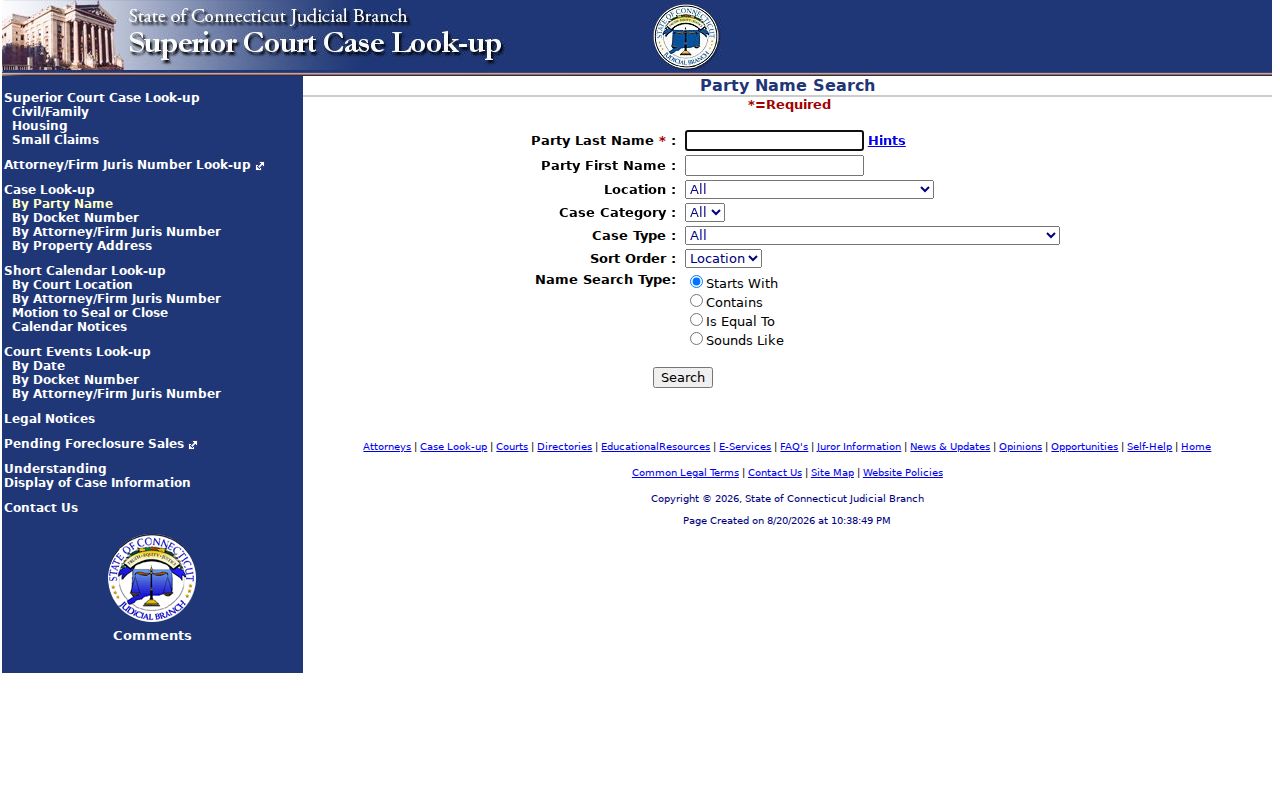
The party-search capture shows the official screen to use for a name lead. Carry the docket number, party role, court location, and date into the next verification step.
Read an East Hartford Docket Result
The Civil Inquiry docket search accepts a location and category, then structured year, number, and suffix fields. The inspected screen uses a two-digit year, seven-digit number, and a suffix that defaults to S. It can include party information and choose all motions and pleadings, the last ten, or none.
A result can expose the docket number, case category and type, court location, filing or return date, party names and roles, attorney or firm, appearances, motions, pleadings, events, case status or disposition, and available document links. A missing image is not proof that no filing exists. It can mean the document is protected, sealed, erased, unavailable, or outside the public display.
| Case identity | Docket number, court location, category/type, filing or return date. |
|---|---|
| Parties | Plaintiff, defendant, petitioner, respondent, or other party role, subject to protection and display limits. |
| Activity | Hearings, motions, pleadings, case events, status, and disposition where shown. |
| Documents | Title, filed date, and available image or PDF, with protected material omitted. |
- Docket
- The court’s identifying number and case record, used to carry a search result to the clerk.
- Index versus image
- An index is a pointer with summary fields. An image is a displayed document when the court permits access.
- Certified copy
- A copy authenticated by the custodian, requested from the clerk or office that holds the official record.
Review the Civil Inquiry docket-search capture for the structured year, number, and suffix route.
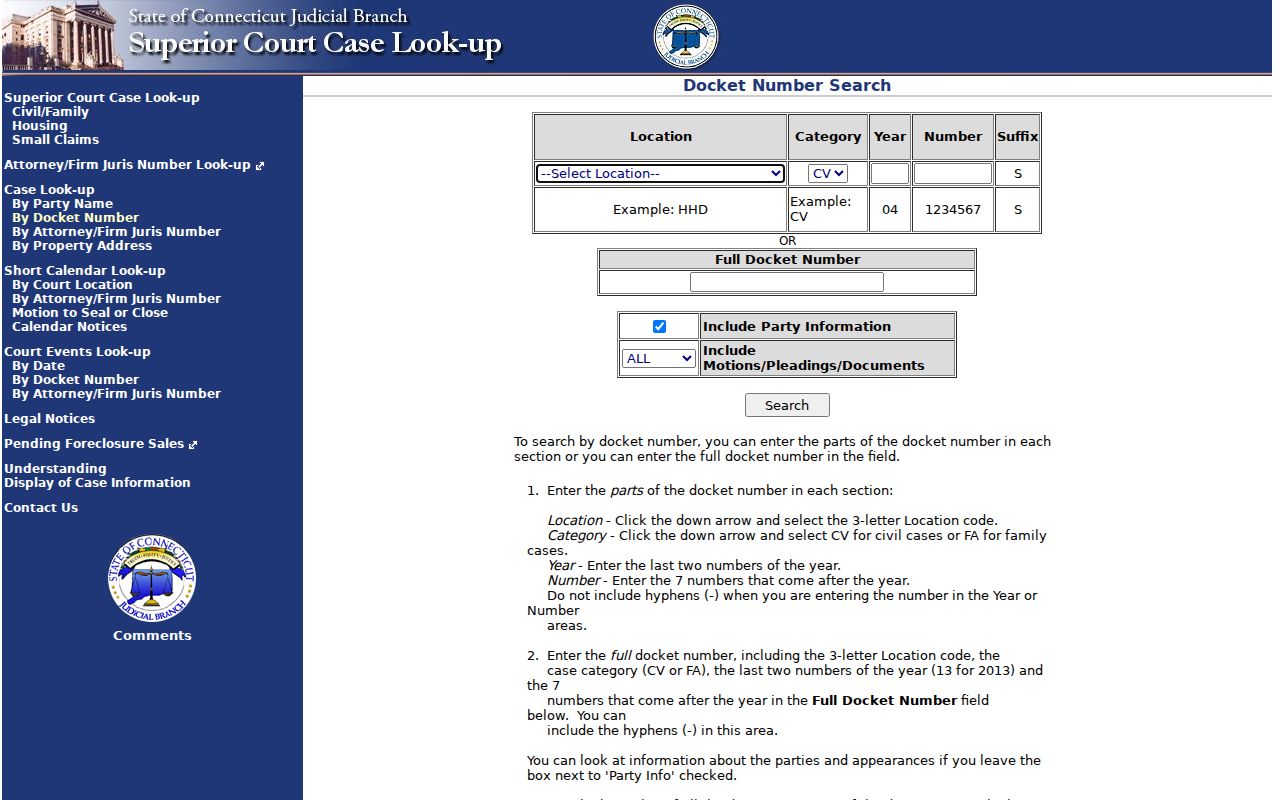
The docket capture is a schema example, not a personal litigant record. For a certified file, contact the clerk with the docket number instead of treating a free index as certification.
Note: Civil Inquiry is a public index, and its disclaimer means a result should be verified with the Judicial Branch before it is used as a factual identity match.
East Hartford Criminal and Probate Routes
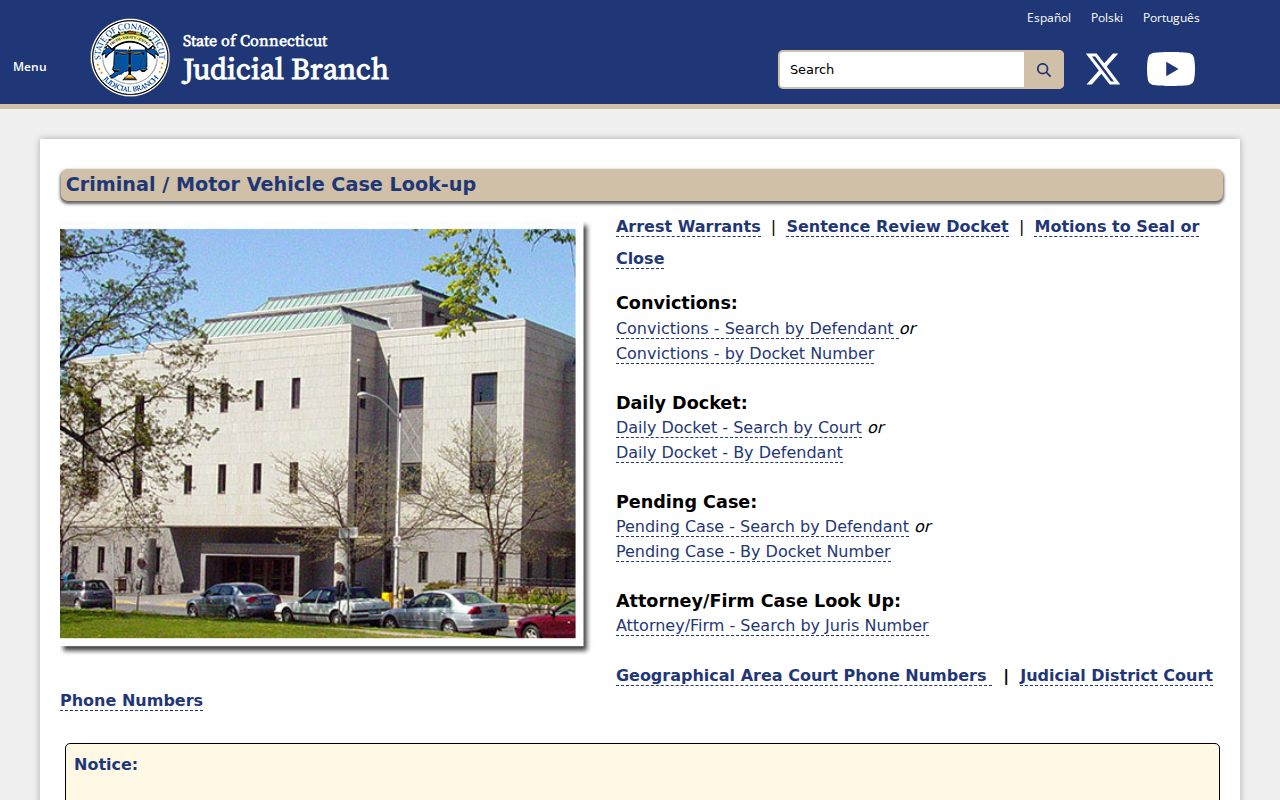
East Hartford criminal and motor-vehicle matters are associated with GA12 Manchester, while Hartford Judicial District offices handle many civil and family functions. The Judicial Branch criminal tools include pending defendant, pending docket, conviction, daily court, daily defendant, attorney or firm, and warrant searches. The pending defendant form asks for last name, optional first initial, birth year, year range, court location, and case type.
The criminal screen warns that data can be incomplete, daily dockets change, and add-on matters may be absent. A conviction search has a recent-history limit and is not a lifetime criminal-history certificate. Use the court location and case type as cross-checks, not as proof that a name refers to a particular person.
Use the Judicial Branch criminal-tools capture to identify the available defendant and docket routes.
The East Hartford Probate Court is District PD-05 at Town Hall. Its case lookup exposes Case Type, District, and Status controls, with case data beginning January 5, 2011. The lookup is free, but access to a will, petition, inventory, or other paper filing depends on interested-party, attorney, sealed, and confidential rules.
Open the East Hartford Probate case-lookup capture for the district and status route.
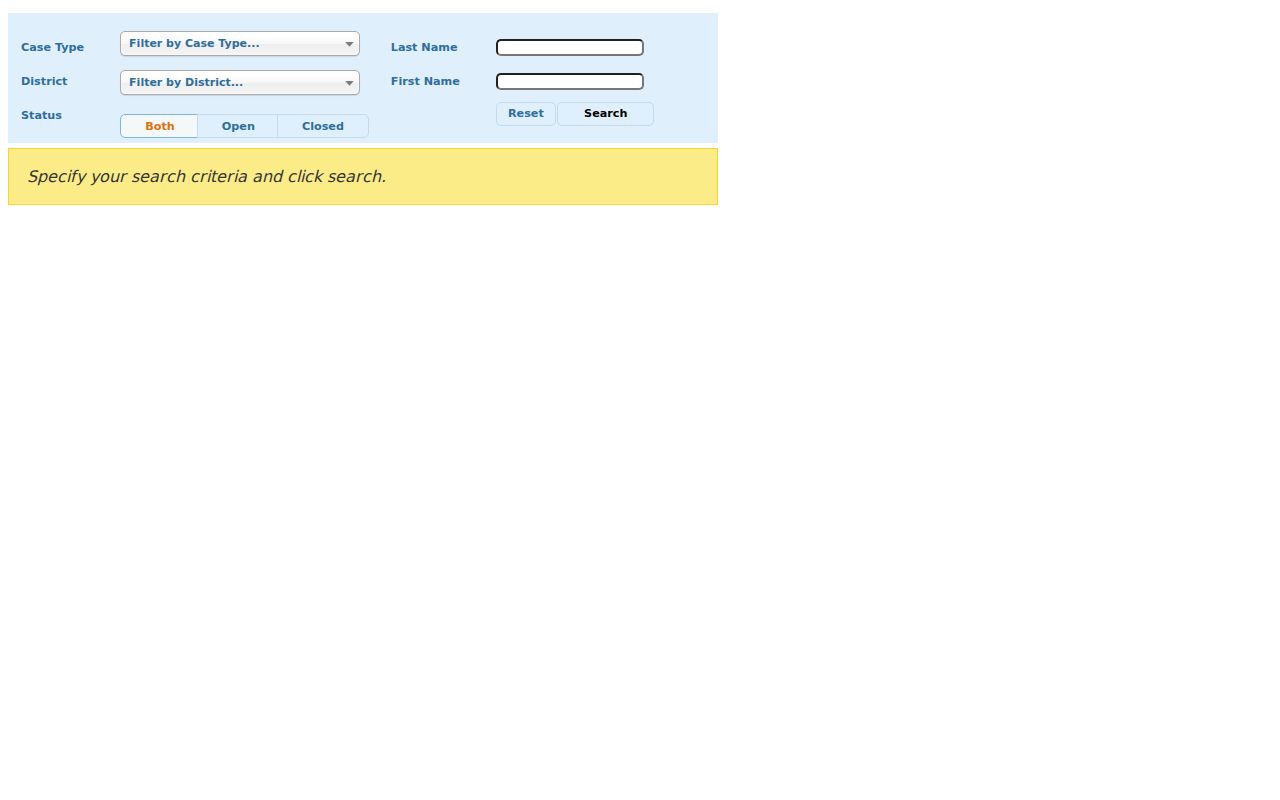
The probate capture shows a route for estate and trust case identity. It does not turn a public case label into unrestricted access to every probate document or every person named in a file.
East Hartford Vital Record Access Rules
The East Hartford Town Clerk supplies local certified-copy forms. DPH holds statewide birth, death, marriage, and fetal-death copies from July 1, 1897 forward. A birth record under 100 years is restricted under CGS § 7-51, while a record at least 100 years old is public. Death and marriage certificates are generally available to an adult requester, but redactions and protected Social Security information still matter.
- Recent birth
- Town Clerk or DPH form. Eligibility, ID, and proof apply; there is no open name search.
- Older birth or genealogy
- Town source, DPH, FamilySearch catalog, or qualifying research route. Public opening at 100 years does not remove the need to identify the event.
- Death
- Town Clerk or DPH. Adult access still has protected fields and identity rules.
- Marriage or civil union
- Town Clerk or DPH. A certificate, license, and court divorce file are different records.
- Divorce
- Superior Court where granted. DPH does not keep the decree.
The Connecticut DPH route lists state offices, forms, ID, and request channels. The local birth form asks for subject and requester details, relationship, reason, signature, certificate size, copies, payment, and proof. Confirm the current local fee and certificate type with the Town Clerk before sending a request.
East Hartford Birth-Parent Searches Follow DCF
A birth-parent search is not an ordinary resident lookup. Connecticut DCF’s Adoption Search Unit handles adult-adoptee, former-foster, birth-parent, and qualifying-relative search and reunion procedures. The route includes DCF-3062 and the Reunion Registry. The agency that handled the adoption researches its own file, and identifying information generally depends on consent or another authorized route.
The Adoption Search Unit is at 505 Hudson Street, 10th Floor, Hartford, with phone 860-550-6582. DPH adoption and foreign-birth guidance should be read with the DCF instructions. An ordinary request for a recent East Hartford birth certificate cannot bypass the under-100-year rule or adoption confidentiality.
Note: A reunion program is an authorized search channel, not a public name index. Keep the request within the agency’s consent and eligibility process.
East Hartford Business and License Records
The Connecticut Business Search accepts business name, ALEI, or filing number. Its documented result fields include business name, Business ID, principal, registered agent, formation date, entity type, and street, city, state, and ZIP. Annual reports may appear as PDFs. Electronic documents are generally free, although records older than 15 years may not be online; plain and certified copy requests are described separately by the state.
East Hartford trade names are filed with the Town Clerk. SearchIQS lists local trade-name index and image coverage from 2007 forward, with earlier index-only coverage from 1922 through 2006. A trade name and a state entity are different filings. Compare the filing date, principal, agent, and address rather than assuming one business record describes all periods.
The Connecticut eLicense roster offers filters for credential number, business or DBA, first name, last name, address, city, state, ZIP, specialty, and practice city. The state says public primary data updates instantly, but historical retention and category fields vary.
See the Connecticut eLicense roster capture for the public filter controls.
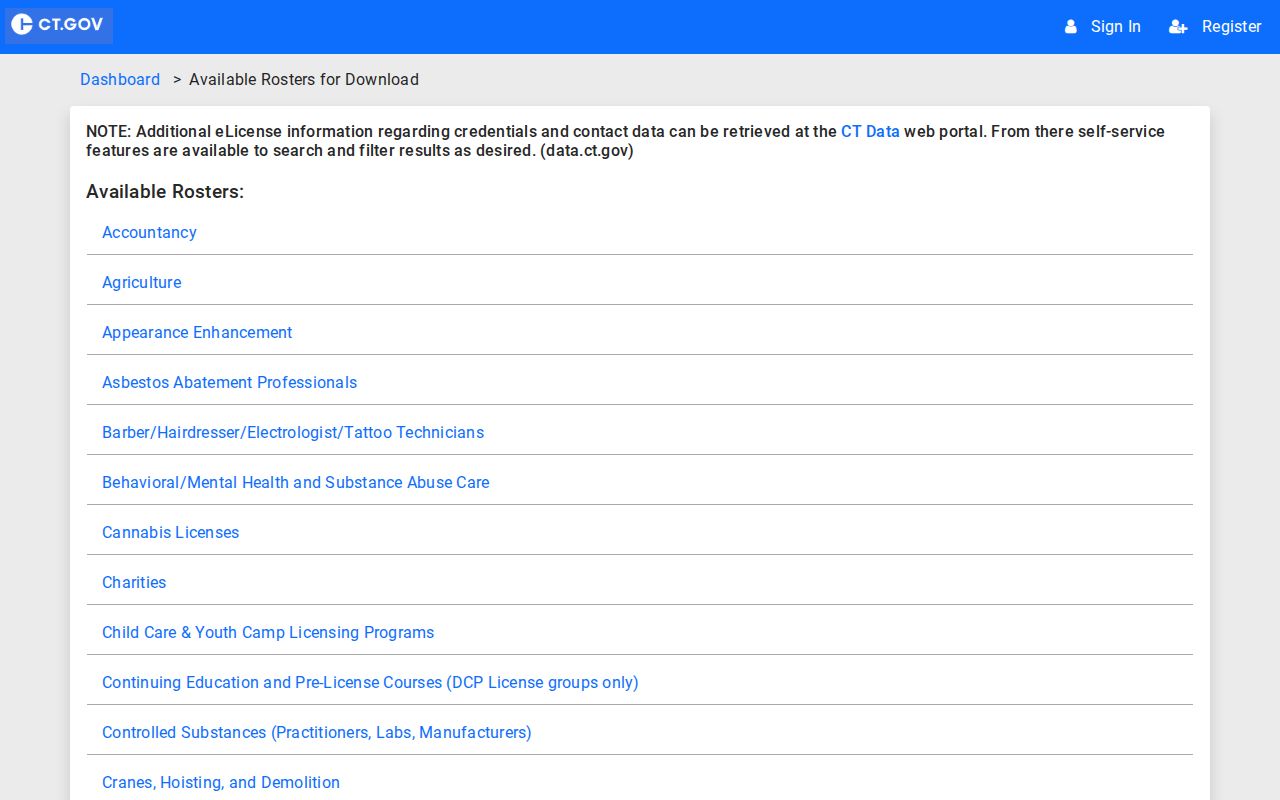
The roster capture demonstrates an affiliation search, not a claim about where a person lives. A license, entity filing, or local trade name should be dated and checked against the question being asked.
Correct a Wrong East Hartford Match
A wrong match should be corrected at the source. For a property card, ask the Assessor about its public field. For a deed or map, contact the Town Clerk. For a court entry, use the clerk’s office and docket number. For a vital record, follow the Town or DPH amendment route. For a voter field, ask the Registrars or SOTS. Do not publish a guess and call it a correction.
Connecticut FOI requests can identify a department, date range, address or parcel, record type, format, and inspection choice. FOI does not override separate access rules. A record can be withheld, redacted, or referred to another custodian even when the request is clear.
Keep a correction log with the source URL, record date, exact spelling, field in dispute, office contacted, and response. If the disputed item is a commercial profile, Connecticut Data Privacy Act rights may apply to covered private processing, but the Act excludes publicly available data and does not rewrite the original government record.
Protected East Hartford Residents and Records
Connecticut has several reasons why a name or address will not appear. Safe at Home supplies an eligible participant with a substitute mailing address and uses the Secretary of the State as a legal agent for forwarding first-class mail. A protected-voter statement under CGS § 9-50d is separate and can make a name and address confidential after the statutory process.
Adoption, juvenile, sealed, erased, confidential probate, restricted birth, and protected court records have their own boundaries. The absence of a name is not evidence that a person has no connection to East Hartford. It may show that the public channel does not expose that field.
The Safe at Home program should be used for eligibility and application questions. Do not try to reverse-engineer a physical location from a substitute address, mailing record, map, or old directory.
Legal Limits When Checking East Hartford Resident Records
A resident lookup is for personal, lawful research such as genealogy, reconnecting with a relative or classmate, estate work, civic questions, or checking a public filing with its custodian. Records can be stale, incomplete, redacted, or about a different person with the same name.
Lawful personal use. East Hartford public records must not be used to stalk, harass, intimidate, threaten, or harm anyone. A public result does not remove the duty to respect protected records, court limits, confidentiality programs, or the source office’s correction process.
When the trail stops, say why it stops. Name the date range, source, and missing field. A careful resident lookup reports a public record connection without claiming more than the record can support.